Is it possible to sync data with other apps like Apple Health, Google Fit,Fitbit,etc..?
Modified on: Wed, 10 Dec, 2025 at 11:21 AM
Applicable to:
Smart Scale(T9140), Smart Scale C1, Smart Scale P2 Pro, Smart Scale P2, Smart Scale P3
Currently, the EufyLife app connects with these fitness apps:
Apple Health, Google Fit, and Fitbit.
We will introduce more apps in the future to improve your experience.
For Android (Smart Scale C20 is the same for IOS):
1. You can go to the Me page
2. Scroll down and click third-party service
3. chose the APP(Fitbit or Google fit) you'd like to synchronize to and follow the instructions to connect.


According to Google's new regulations, third-party apps will no longer be able to synchronize data directly with Google Fit. Instead, these apps must be connected to Google Fit through Health Connect. Please complete the download and authorization of Health Connect first.
Health Connect is Google's official health SDK (Software Development Kit), which means that all guidelines for its
use and interpretation are indeed provided by Google. Please refer to the below pictures for guidance about how to bind Google Fit.
For iOS:
1. You can go to the Me page
2. Scroll down to choose to connect to Apple Health or Fitbit.
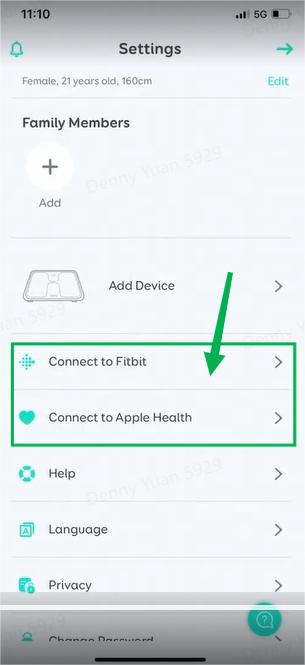
Please note only the data under the main user can be synced to these apps, if there are multiple users, we suggest each user register his/her own EufyLife account to make sure it can be synced with the Apple Health/Fitbit/Google Fit.
If EufyLife App doesn't sync with the Apple Health/Fitbit/Google Fit, please contact us for further troubleshooting.
Was this article helpful?
That’s Great!
Thank you for your feedback
Sorry! We couldn't be helpful
Thank you for your feedback
Feedback sent
We appreciate your effort and will try to fix the article